


PostHog is an open-source, all-in-one platform that product engineers use to understand how people use their product and their website. It rolls more than eight tools into one: product analytics, session replay, feature flags, A/B testing, surveys, a data warehouse, and a customer data platform (CDP). Instead of paying for Google Analytics, a replay tool, a flag service, and a CDP separately, you get them in one place, built on the same event data.
Quick context on why you should trust this one. I am JJ, founder of VisionLabs. My team and I have shipped more than 20 PostHog implementations for companies that range from teams of one to teams of 100, we manage around 30 PostHog accounts right now, and we run PostHog on our own site every single day (we eat our own dog food).
So this is not a feature list copied off the docs. It is how I actually set PostHog up, what I switch off on day one, and the mistakes I watch teams make over and over. By the end you will know what PostHog is, how to install it, how to read your data, and roughly what it will cost you.
What is PostHog used for?
PostHog is used to capture user behavior and act on it in one system. You install one snippet, it starts collecting events, and from those events you build funnels, watch session recordings, ship features behind flags, run experiments, and pipe the data out to your ad platforms or warehouse.

Here is what lives inside the platform:
- Product analytics: funnels, trends, retention, user paths, and dashboards.
- Web analytics: a lightweight, privacy-friendly view of pageviews and sources.
- Session replay: watch real recordings of users, with console logs and network requests.
- Feature flags: roll a feature out to a cohort or a percentage of users.
- A/B testing: experiments built on top of flags and analytics.
- Surveys: in-app NPS, CSAT, and custom questions.
- CDP and data pipelines: unify and route data to 60+ destinations.
- Data warehouse: query your events with SQL and sync external sources in.
The reason teams pick PostHog over a single point tool is that all of this shares one event stream and one person profile. Watch a funnel drop off, jump to the replay of that exact user, then ship a fix behind a flag, without leaving the tab. You can read the full picture in our PostHog academy.
How PostHog works: events, people, and the data model
PostHog works by collecting events, attaching them to people, and rolling those people up into cohorts and groups. Once you understand that hierarchy, every feature in the product makes sense.
Here is the structure we use to explain it to clients, from the bottom up:
- Properties live inside events. A pageview event carries properties like the URL path, the browser, and whether the user is on mobile or desktop.
- Events belong to people. One person views a page, adds to cart, signs up, and starts a trial. Those are four events on one person.
- People are the profiles those events roll up into.
- Cohorts group people by shared characteristics or actions, like everyone who completed a quiz in the last 30 days.
- Groups roll people up by organization or account, which matters for B2B software.
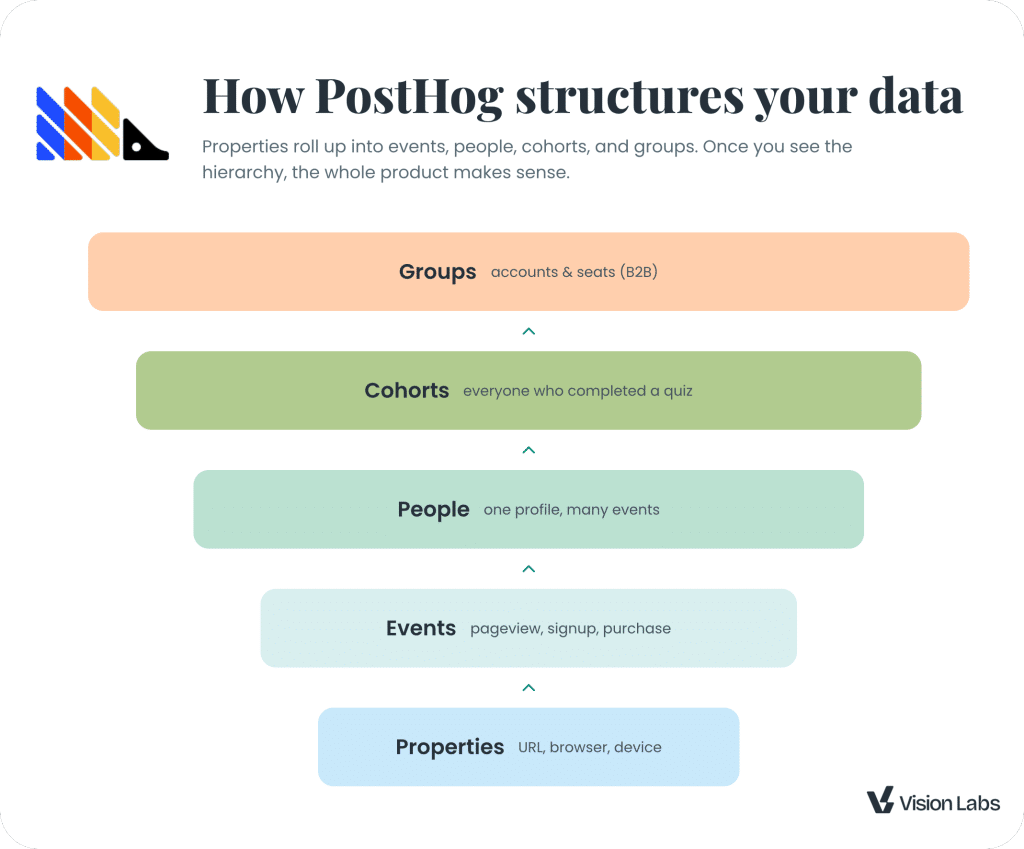
Everything in PostHog is some combination of those five layers. A dashboard is built from events. A feature flag targets a cohort. An experiment measures an event for people in a group. Keep the pyramid in your head and you will never get lost in the UI.
🎥 Watch: How cohorts and groups work in PostHog
Setting up PostHog: events, autocapture, and identifying users
Setting up PostHog takes three moves: install the snippet, decide what events to capture, and identify your users so their journeys connect. Most teams get the first one right and the other two wrong, so this is where to spend your attention.
Turn autocapture off (yes, really)
When you install PostHog, autocapture starts recording every click, form submit, and pageview automatically. That feels great for about a week, until you hit your event limits. Autocapture can nearly double your event volume, and on top of pageviews it adds page-leave events, rage clicks, and web vitals.
Our rule: if you do more than about 2,000 sessions a month, turn autocapture off. Every client we work with runs with autocapture off. You do it in Settings, then toggle off autocapture and the web vitals you do not need. Now you control what gets counted.
Send custom events with posthog.capture
With autocapture off, you send the events you actually care about. On the browser we deploy them through Google Tag Manager so marketing can manage them without a developer. The call is simple:
// Capture a custom event when someone views a call to actionposthog.capture('cta_viewed', { cta_name: 'posthog_audit' })Name events with the object-action framework: the object first, then what happened. cta_viewed, workshop_registered, lead_generated. Then add a property to describe the specifics, like cta_name or workshop_name. Good names are not cosmetic. They let you read your activity feed at a glance and break events down later. We go deeper on this in how PostHog events and autocapture work.
For backend events, you send the same kind of call from your server, a webhook, or a low-code tool. The point is that PostHog takes events from the browser and the backend into the same stream.
Identify users so their journey connects
identify is how PostHog ties an anonymous visitor to a known person. Until someone gives you an email, they are an anonymous ID. When they convert, you call identify and PostHog stitches their whole history onto one profile.
// Connect the anonymous visitor to a real personposthog.identify('[email protected]', { company: 'VisionLabs', location: 'Reno, NV' })One setting matters here. By default, person profiles are created for identified users only. Change it to always, so PostHog stores a profile for every anonymous visitor and merges it the moment they identify themselves. Get this wrong and your funnels and retention will quietly lie to you, because anonymous and known sessions never join.
🎥 Watch: PostHog events, autocapture, and identify
Building your first dashboard (and a real conversion rate)
A PostHog dashboard is a group of insights, and an insight is any chart you build from your events. To build your first one, create a dashboard, name it right away (it defaults to “new dashboard” and you will forget), then add insights one at a time.
Here is the quick path we use for a launch or promotion dashboard:
- Add a scorecard. Create an insight, pick a “number” chart, choose the pageview event, and filter where the current URL contains your landing page path. That gives you unique visitors at a glance.
- Track registrations. Add another number insight on your
workshop_registered(or signup) event, broken down by a property like the campaign name. - Add a trend line. Plot viewed against registered over time so you can watch the launch move.
- Calculate a conversion rate. This is the least obvious part of PostHog. Duplicate your trend insight, enable formula mode, and the two series become variables A and B. Enter
B / A * 100, switch the display to a number, and set the unit to percentage. Now you have a live conversion rate, for example 6 registrations out of 22 visitors, which is 27 percent. - See your sources. Add a breakdown by the initial UTM source. Use the person property, not the event property, so you capture where the user first came from rather than the last page they navigated from.
That covers 60 to 80 percent of what most product and marketing teams need. The trick is to know the answer you want first, then build the insight backward from it.
🎥 Watch: How to build dashboards in PostHog
Set up alerts so problems find you
PostHog alerts watch a metric and message you when it crosses a line you set, so you learn that a conversion rate dropped before your boss does. It is one of the most underused features in the product, and it takes about a minute to set up.
Build an insight first, like the conversion rate from the last section, and save it. Then open the three-dot menu on that insight and create an alert. Set a low and a high threshold. We alert when our lead conversion rate drops below 1 percent or jumps above 5 percent, because both usually mean something broke, traffic shifted, or volume changed. Run the check daily, or hourly if you want it to average the last day.
Send the alert where your team already works:
- Email, with specific teammates assigned to specific alerts.
- Slack, a webhook, or any CDP destination, using plain text or Slack blocks.
You will set up a pile of these over time, so remember where they live: Data pipelines, then Destinations. One warning from experience: skip the error-tracking alerts. They rarely fire the way you expect, and one bad setup will spam your team until they mute everything.
🎥 Watch: PostHog alerts
How do you use session replay in PostHog?
Session replay lets you watch a recording of a real user moving through your site or app, with their clicks, console logs, and network requests attached. You find replays on a person’s profile or in the Session replay section, and the real skill is recording less, not more.
Here is the contrarian part. If your event naming is clean, your events already tell 90 to 95 percent of the story. We mostly watch replays of people who filled out a form, logged in, or did one specific high-intent thing, which ends up being about 1 percent of all sessions. Replays are for the edge cases events cannot explain, not for daily viewing.
The trap is cost. Most teams we work with burn through the 5,000 free recordings in the first few days of a billing cycle. Roughly, 10,000 recordings run about $25, 20,000 about $60, 40,000 about $125, and 60,000 about $200. Control it in Settings, under session replay:
- Sampling: set it to 50 percent so you record one in two sessions. This is the biggest easy saving.
- Minimum duration: 5 seconds, which quietly drops bounces and bot traffic.
- Start trigger: only start recording when the URL matches, for example anything that contains
/contact. Use a regex like.*contact.*so it matches URLs with parameters instead of one exact string. You can also start on an event or a feature flag.
If you still hit the cap, run Microsoft Clarity alongside PostHog. Deploy Clarity through Google Tag Manager, pass the PostHog session ID into Clarity, and you get unlimited free recordings that you can match back to a PostHog session by ID. To keep a specific PostHog replay past its 90-day expiry, drop it into a Notebook.
🎥 Watch: PostHog session recordings
Collecting user feedback with surveys
PostHog surveys let you ask a question right inside your product or site, for both anonymous visitors and people you have already identified by email. Skip the AI survey builder and the canned NPS and product-market-fit templates. Open feedback is the format that actually gets used.
Before you build anything, answer four questions: what you will ask, how you will ask it, when you will ask it, and what you will do with the responses. If you cannot answer all four, stop and figure them out first.
For setup, a popover is the easiest format to ship. Then comes the part most people miss, targeting. You can target by feature flag, but we target by event, because events are cheap and, if you named them with the object-action framework from earlier, trivial to extend. Fire the survey after lead_generated, for example, so you ask the moment someone converts. Set the frequency to once per user or every time the event occurs, and stop after a number of completions.
Then read the results and act. An exit-intent survey we ran got 20 responses, and the top answer was “I am not sure what your services are.” That told us to fix our messaging, not our funnel. Pipe responses to a Slack channel or your CRM with a notification so feedback reaches a human while it still matters.
🎥 Watch: PostHog surveys
What are cohorts and groups in PostHog?
Cohorts are user-based lists defined by shared behavior, and groups are an event-based, paid add-on that rolls people up by organization. They look similar in the UI, but they are built differently and you use them for different jobs.
A cohort is a flexible group of people you define: everyone who completed a quiz in the last 30 days, everyone who viewed the pricing page then purchased, every pro member.
You create one under People, then add it as a filter or breakdown on any dashboard. In one client account, people who completed a quiz converted far above average, which told us to push more users into quizzes.
One thing to know: cohorts are user-based, not event-based, so they look at a person’s entire history. Someone can land in a “viewed cart then purchased” cohort even if the order of those events was messy.
A group is for software with accounts and seats. If 10 people belong to one organization, groups let you measure usage at the account level, not the person level.
Groups are an add-on you pay for, and the first million group events are free. The rule that trips everyone up: every event you send must carry the group identifier, or the rollup does not work. Identify works once for a person, but groups need the group ID on every single event.
If you do not have the budget or the engineering time for groups, you can get most of the way with cohorts. If you run B2B software and you need true account-level analytics, groups are worth it.
Can PostHog replace your CDP? Meta Ads example
Yes, PostHog can work as a customer data platform, because identify unifies your web, product, and CRM events onto one person profile, and then data pipelines send that unified data out to destinations like Meta. This is one of the most useful and least understood things PostHog does.
Here is the pattern we implement constantly. A visitor clicks a Meta ad, and PostHog stores their Facebook click ID (the fbc) as a person property, with both an initial and a latest value, out of the box. They submit a form and become a lead.
Later your CRM sends events back into PostHog (we use HighLevel, but HubSpot works the same way), and because everything is keyed to the same email, the web events and the CRM events land on one profile. Now PostHog is acting as a true CDP, sitting between your front end, your back end, and your ad platforms.
The trap to avoid is duplicate events. We had a client sending purchases to Meta from HubSpot, from PostHog, and from their product all at once. Meta counted every purchase three times, which wasted millions in ad spend on bad optimization. Pick one source of truth, your analytics tool, and let it send the conversion onward.
To actually send the data, go to Data pipelines, then Destinations, add Meta Conversions, and paste in your pixel ID and access token. Choose the events or actions that should fire, like lead_generated or submit_application.

PostHog sends those server to server, which is far more reliable than browser pixels. The one caveat: events from a CRM or a calendar tool sometimes have no URL, so you may need to rewrite the source URL for those.
You can optimize Meta ads for down-funnel events like booked calls or closed deals, not just top-of-funnel leads, because the whole journey lives on one profile.
We ship this for clients constantly. In our PostHog and Shopify case study with Natural Heart Doctor, we tied every lead to revenue and reported lifetime value by acquisition channel, all from one unified profile.
🎥 Watch: How to sync PostHog with your CRM and send PostHog events to Meta
How much does PostHog cost?
PostHog is free for your first 1 million events per month, then it charges by usage, per product. PostHog is famously transparent about pricing, and that transparency creates real complexity, because your bill depends on which products you turn on and how many events you send.
A few numbers we use to estimate fast:
- One user is roughly 20 to 50 events per month. Multiply your monthly users by 50 for a worst-case event count.
- The first 1 million events are free. Below about 10,000 users a month, most teams pay nothing.
- Session replays are the most expensive part. You get 5,000 free, and we cap most clients there and record strategically. Pushing replays to 120,000 puts you around $300 a month, and 20,000 replays runs about $67.
- Feature flags and surveys are cheap. These rarely drive the bill.
- Group analytics, the data warehouse, and pipelines are separate line items you can leave off.
| PostHog product | Free tier | Notes |
|---|---|---|
| Product analytics events | 1,000,000 / mo | The core meter, anonymous or identified |
| Session replays | 5,000 / mo | The expensive one, cap it |
| Feature flags | 1,000,000 requests / mo | Usually not a budget problem |
| Surveys | Generous free tier | Cheap per response |
| Group analytics | 1,000,000 group events / mo | Paid add-on for account rollups |
For comparison, to roughly match Google Analytics 360 at 25 to 30 million website events a month, you would pay around $4,200 on GA360 versus about $1,300 on PostHog, with a lot more capability. Most teams we work with land under $1,000 a month. Run your own numbers with the PostHog pricing calculator before you commit.
🎥 Watch: PostHog pricing explained (VisionLabs)
PostHog vs Google Analytics: which should you use?
PostHog and Google Analytics solve overlapping problems differently. Google Analytics is a free, anonymous web analytics tool. PostHog is a paid, identity-first product analytics platform that also does web analytics. We run both for clients in parallel during a migration, and these are the differences that matter.
| Aspect | PostHog | Google Analytics (GA4) |
|---|---|---|
| Users | Ties events to an email and a person profile | Anonymous pseudo IDs, no email |
| Data in | posthog.capture, webhooks, and API with email as the unifier | Measurement protocol, complex and fragile |
| Data out | Exports to BigQuery, Snowflake, Slack, HubSpot, and 60+ more | Mostly Google products (Ads, Search Console, BigQuery) |
| Reporting | Dashboards and insights, easy to share | Reports and explorations, hard to share |
| Customization | Write SQL anywhere with HogQL and ClickHouse, plus the Max AI query builder | Stuck in the UI unless you go to BigQuery |
| Cost | Generous free tier, then usage-based | Free, or expensive at GA360 |
The short version: choose PostHog when you want backend and CRM data unified with web data, real session replay, and SQL-level customization. Google Analytics is fine when you only need anonymous web traffic reporting and you live inside the Google ecosystem. The moment you want to act on your data, send it to ad platforms, or ask deep custom questions, PostHog pulls ahead. We break down all six dimensions in our full PostHog vs Google Analytics comparison.
🎥 Watch: PostHog vs Google Analytics (VisionLabs)
Is PostHog right for you in 2026?
PostHog is right for you if you are a technical team that wants analytics, session replay, feature flags, experiments, and a CDP in one open platform. It is less of a fit if you are a non-technical, marketing-led team that needs a no-code, in-app engagement layer, because that is not what PostHog is built for.
What makes 2026 a good time to adopt it is the AI and warehouse layer. PostHog’s Max AI writes HogQL for you and is one of the better query builders we have used, it ships an MCP server so you can wire PostHog into AI agents, and the data warehouse lets you query your events next to Stripe, HubSpot, and Zendesk data. PostHog also ships updates constantly, which is a real contrast with tools that change cookie behavior overnight and break your setup. You can read the technical detail in PostHog’s documentation and browse the open-source codebase on GitHub.
If you want to see it working before you commit, watch a PostHog demo. And if the setup feels like a lot, that is exactly why VisionLabs exists.
We implement PostHog for teams of one to teams of 100, run it in parallel with your current analytics, and get your product, marketing, and CRM data into one place you can actually act on. You can browse real PostHog implementations we have shipped to see what that looks like in practice. If you want a second set of eyes, we run a PostHog audit at visionlabs.com/thehog: we review your setup, fix your event structure, and hand you a roadmap. That is what PostHog is, and that is how you make it pay for itself.


