
Most teams install PostHog, watch events flood in, and assume they’re winning. Three months later, they’re buried in 50,000 auto-capture events they can’t make sense of, and their bill looks like a phone number.
The issue isn’t PostHog. It’s event architecture.
I’m JJ from Vision Labs, and I’ve implemented PostHog for high-volume products and marketing sites. The teams that win structure their events around one principle: object-action naming with properties for context.
Here’s how to build an event system that scales.
What Are PostHog Events and Why Do They Matter?
PostHog events are the building blocks of understanding how users interact with your marketing and product. They come in different flavors:
- Auto-capture events: Automatically track clicks, page views, rage clicks, and more.
- Custom front-end events: Manually created events to capture specific user actions.
- Backend events: Server-side events that track qualified leads or CRM interactions.
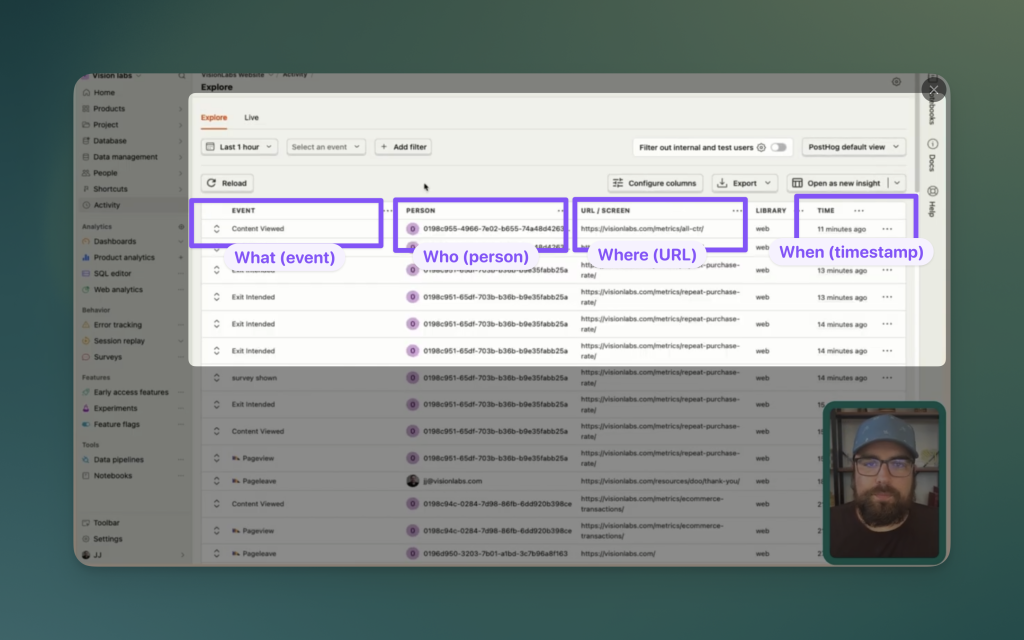
Together, these events paint a comprehensive picture of user behavior, helping you optimize your funnel and ultimately drive revenue.
What Is Auto-Capture (And Why It’s Probably Costing You)
Auto-capture is PostHog’s default behavior that automatically tracks every click, input change, and form submission on your site. Sounds great in theory.
In practice? It nearly doubles your event volume.
Here’s what I see in most PostHog instances: if you have 2,400 auto-capture events, you probably have around 2,400 pageviews too. That’s essentially 2x the events for data you likely won’t use. Add in page leave events, rage clicks, and web vitals—your event count spirals fast.
Every client we work with at Vision Labs has auto-capture turned off. Unless you’re running a very low-volume site (under 2,000 sessions per month), you should too.
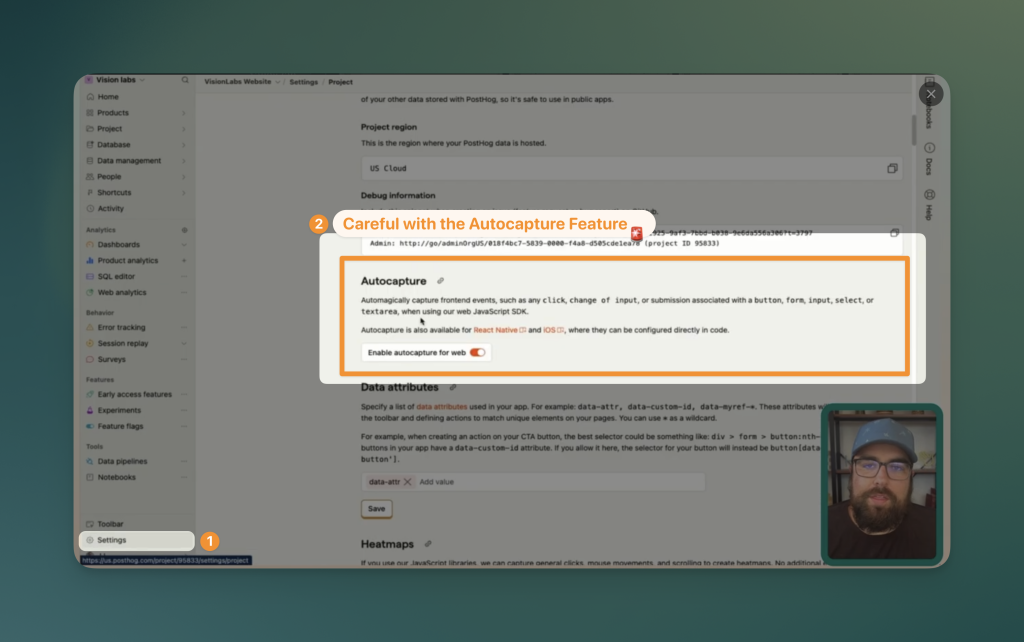
How to Turn Off Auto-Capture
- Go to Settings in your PostHog project
- Scroll down to find the Auto-capture toggle
- Turn it off
- While you’re there, consider turning off Web Vitals tracking too
Auto-capture is the biggest culprit for massive event volume. Turning it off is step one to getting control of your data.
Event Naming Best Practices: The Object-Action Framework
Event names matter more than most people realize. When you’re building dashboards or analyzing funnels six months from now, clear naming saves hours of confusion.
We use the Object-Action Framework:
Structure: [Object]_[Action]
- Object: What is the thing? (CTA, lead, form, video)
- Action: What happened to it? (viewed, clicked, submitted, played)
Examples
Event NameObjectActionCTA_viewedCTAviewedlead_generatedleadgeneratedform_submittedformsubmittedvideo_playedvideoplayed
Then use properties to add specificity:
posthog.capture('CTA_viewed', {
    CTA_name: 'posthog_audit',
    page_location: 'homepage_hero'
});
This structure makes it easy to filter and segment later—you can see all CTA views at a glance, then drill down by specific CTA name.
Every event should tell you what (the object) and what happened (the action).
- Object: The thing the user interacted with—CTA, form, video, feature
- Action: What they did—viewed, clicked, submitted, completed
- Properties: Specifics—which CTA, which form, which video
Good event names
CTA viewed(property:CTA name: "PostHog audit")form submitted(property:form name: "contact us")video played(property:video title: "onboarding walkthrough")
Bad event names
button_click_homepage_cta_3contact_form_submit_final_v2video_start_intro
Good names stay scannable. Properties carry the detail. Bad names force you to parse structure every time you scan your event list.
How to capture front-end events with GTM
Disable auto-capture in PostHog settings. Then deploy custom events via Google Tag Manager.
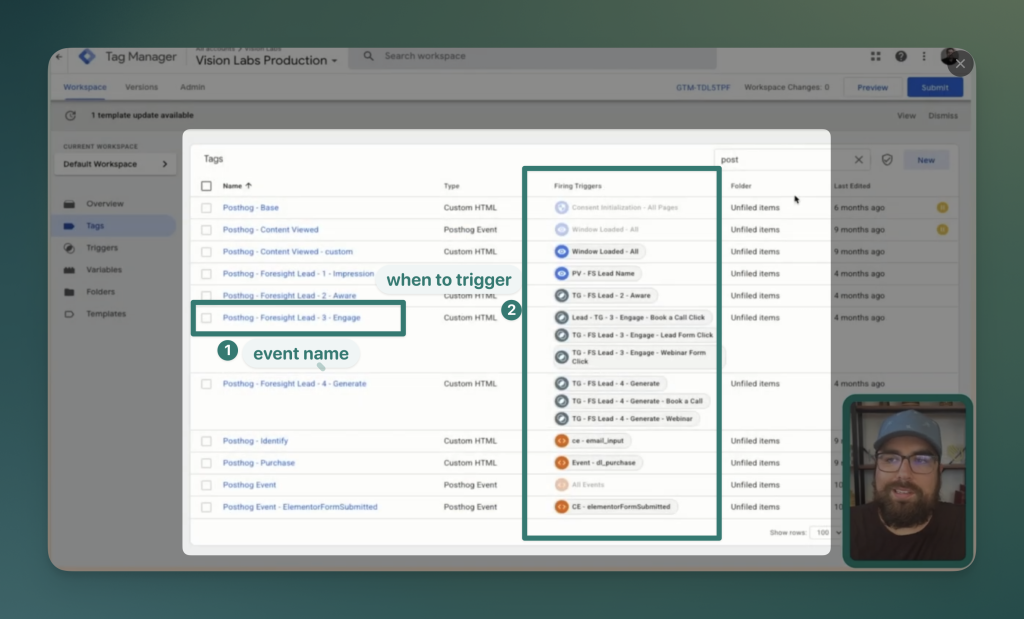
Here’s the script:
posthog.capture('CTA viewed', {
  'CTA name': 'PostHog audit'
});
Create a custom HTML tag in GTM with this code. Set the trigger to fire when someone views or clicks your CTA element. Replace 'PostHog audit' with a variable if you’re tracking multiple CTAs.
Now your event explorer shows:
CTA viewed: 150 events- Property breakdown: 60 for “PostHog audit,” 50 for “Free consultation,” 40 for “Case studies”
You can see total CTA engagement and compare performance across variations—all in one event name.
Real example: how we structure lead events at Vision Labs
We run a content site with multiple lead magnets. Here’s our event structure:
Tiered events:
lead generated general— Total leads across all magnets (102 events)lead generated Looker Studio cheat sheet— Specific magnet (41 downloads)lead generated data order of operations— Specific magnet (35 downloads)lead generated image metric grid— Specific magnet (26 downloads)
The general event fires every time someone downloads anything. The specific events fire for each magnet. The numbers aren’t additive—one lead triggers both the general and specific event.
Why use two event tiers? You can quickly see total leads (102) and compare magnet performance without filtering.
Supporting events:
lead engaged— User viewed a lead magnet page but didn’t convertlead impression— User saw a lead magnet CTA
This three-stage funnel (impression → engagement → generation) lets us calculate conversion rates at each step.
Backend Events: Server-Side Tracking That Actually Works
This is where PostHog pulls ahead of Google Analytics. GA4’s Measurement Protocol is a nightmare. PostHog makes backend events straightforward.
When You Need Backend Events
Browser events only capture what happens on your site. But the full customer journey includes:
- CRM qualification status
- Sales rep interactions
- Payment processing
- Product usage (for SaaS)
- Support ticket creation
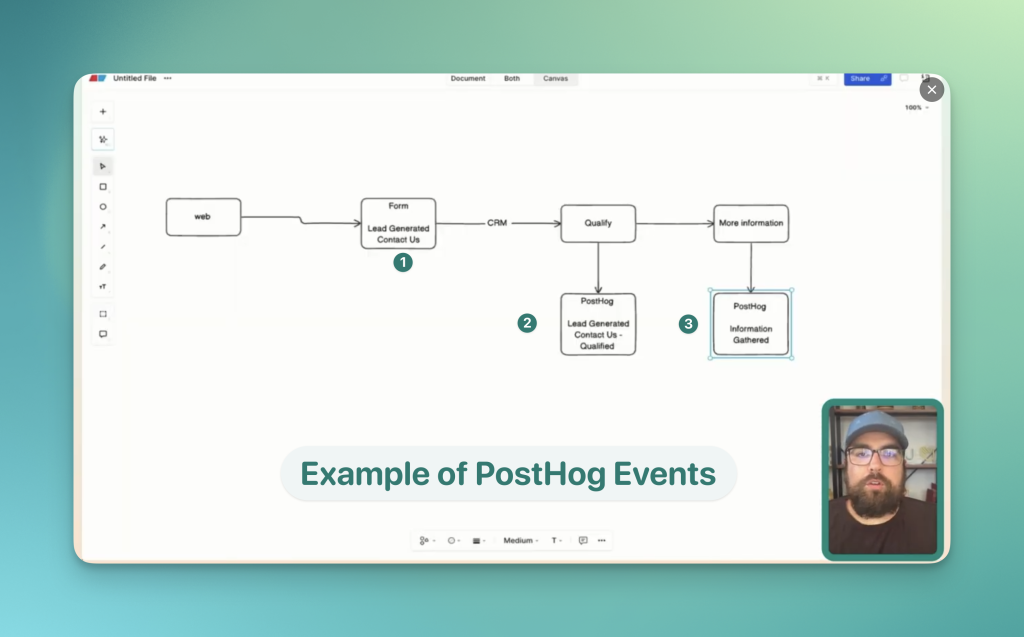
The Flow
- Browser: User submits contact form →
lead_generated_contact - CRM: Sales qualifies the lead →
lead_qualified_contact - Sales: Rep gathers more info →
information_gathered - Product: User activates →
user_activated
Each of these backend events gets sent to PostHog and stitched to the same user profile. Now you can see the complete journey from first touch to revenue.
Low-Code Solution: N8N
If you don’t have engineering resources for custom integrations, N8N is a solid low-code option. PostHog has a native N8N integration that handles authentication for you.
Creating an event in N8N:
- Add a PostHog node
- Select Create Event
- Set your event name (e.g.,
lead_generated_contact) - Add the
distinct_id(how PostHog identifies the user) - Add any properties (lead_name, company_size, etc.)

The event shows up in PostHog within seconds, complete with all your custom properties
Browser events show interest; backend events show outcomes.
User Identification in PostHog: Connecting Anonymous and Known Users
Here’s what makes PostHog powerful for full-funnel tracking: the identify call stitches anonymous browsing sessions to known user profiles.
How It Works
- Anonymous user visits your site → PostHog assigns them ID
abc123 - User browses multiple pages, triggers events
- User submits form with email → You fire
posthog.identify('user@email.com') - PostHog merges
abc123withuser@email.com - All past anonymous activity now appears on their profile
Critical Setting: Person Profiles
By default, PostHog only creates person profiles for identified users. Change this.
Go to Settings → Person Profiles → Set to Always
This stores profiles for anonymous users too, so when they eventually identify themselves, all their history comes with them.
Browser-Side Identification (GTM)
<script>
posthog.identify('{{user_email}}');
</script>
Fire this tag when:
- User submits a form (and you have their email)
- User logs in
- User creates an account
Important: Only fire after you have consent and their email. Use GTM’s trigger conditions to gate this appropriately.

Front-end identify call
Deploy this in GTM after someone submits a form or logs in:
posthog.identify('user@example.com');Use your email variable instead of the hardcoded string.
Backend identify call
Use n8n (or your tool of choice):
- Switch from “Create Event” to “Identify”
- Set distinct ID to the user’s email or ID
- Add person properties: company name, location, role, plan tier
PostHog appends these properties to the user profile. Every event—past and future—lives under one unified profile.
Pulling it all together: the complete event architecture
Here’s what your PostHog setup should include:
Front-end events (via GTM):
- User actions: CTAs, form submissions, video plays, feature interactions
- Named with object-action convention
- Properties for specifics
Backend events (via webhooks/automation/code):
- Post-browser actions: qualification, payments, fulfillment, support
- Same naming convention
- Properties for context
Identify calls (both ends):
- Front-end: After form submission or login
- Backend: After CRM enrichment or account creation
- Merges anonymous and known behavior
Auto-capture:
- Off (unless you’re under 2k sessions/month)
This architecture gives you complete user journeys without drowning you in noise.
What happens when you get this right
You can answer questions like:
- Which lead magnets drive qualified leads? (Compare
lead generated [magnet name]tolead qualified) - Where do users drop off? (Funnel analysis from impression → engagement → generation)
- Which CTAs convert best? (Property breakdown on
CTA viewedandCTA clicked) - What do qualified leads do before converting? (User profile journey view)
You stop guessing. You start reallocating spend, prioritizing product work, and improving conversion paths based on complete data.
Checklist to set up PostHog events
- Track the full journey: From anonymous first visit through purchase and beyond
- Control costs: No auto-capture bloat eating through your event quota
- Analyze cleanly: Object-Action naming makes dashboard building and funnel analysis intuitive
- Enable downstream tools: Clean events can sync to Meta and other ad platforms for better optimization
- Debug effectively: Use session recordings alongside your events to see exactly what users did
- Stay proactive: Set up alerts on key events to catch issues or opportunities in real-time
The goal isn’t just collecting data it’s building a system where you can see how users navigate your marketing, your product, and ultimately drive revenue. All in one place. All stitched together.
Need help implementing your PostHog events?
If this feels like a lot to implement on your own, reach out. We run PostHog audits, help migrate from GA4, and build event architectures that actually answer business questions.
Head to visionlabs.com/contact and let us know you want to talk PostHog. We’ll get your system purring—so you’re acting on your data, not just looking at it.